Web1040 Pro allows users to use a signature pad to capture the signatures of the preparer as well as the taxpayer(s) electronically. This feature will apply the taxpayer and preparer signatures to all supported forms. The option to use the signature pad will vary with each state and with each bank.
Topaz Systems Inc. and Scriptel signature pads are supported in Web1040 Pro. The pads are connected to the computer through a USB port. A basic signature pad will cost around $100. We have tested two signature pads for compatibility:
There are other models available, but they have not been tested for compatibility and are not guaranteed to work with the program.
To set up your Topaz Signature Pad, you will want to download Topaz Sigweb. This will be needed to sign. You can find this download here.
In order to use the Topaz signature pad within your tax office, you will need to set it up in your configuration. To do this, from the Main Menu of the Tax Program select:
- Configuration
- Office Setup
- Office Configuration - You will need to check the box in this section that says Use Topaz Signature Pad
The Scriptel signature pad does not need to be setup in configuration. Simply download Scriptel Sign and Save and the Scriptel toolbox and you're ready to go!
The Scriptel Signature pad will allow you to use the mouse and the signature pad in your office at the same time. You will not have to go back into configuration and check the "Use Topaz Signature Pad" box. This means you can now flawlessly switch between the mouse and the signature pad without any added steps.
To set up your Scriptel Signature Pad, you will want to download Scriptel Sign and Save. This will be needed to sign. You can find this download here.
Inside Sign and Save you will be able to test out your signature pad:
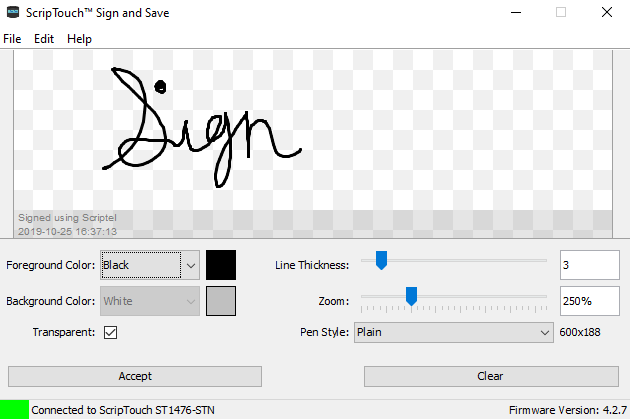
You will also want to download the Toolbox which is available here. The Scriptel Toolbox allows you to switch the signature pad to work between programs.
Inside the Toolbox, you will want to click on the Output tab. This will allow you to choose your Output Mode. For Web1040 Pro, select EasyScript Mode.
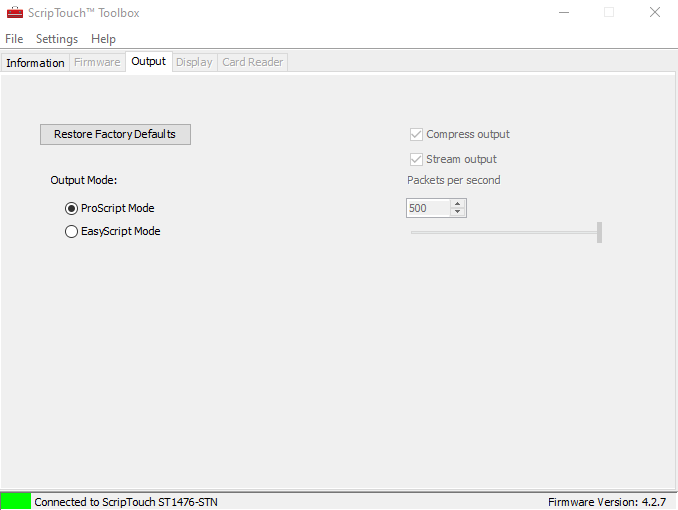
After setting up Sign and Save and selecting your Output Mode, you're ready to go with your new Scriptel signature pad.
After getting your signature pad setup, you will be able to use it for both the preparer's signature and the taxpayer's signature in place of the mouse.
For the preparers, their signatures can be captured on the Preparer Setup Menu. To get there, from the Main Menu of the Tax Program select:
- Configuration
- Preparer Setup
- At the bottom of the Preparer Setup, you will be able to set up the preparer's signature
For the taxpayers, they will be able to sign with the signature pad on the Submission Page of the return.
With Web1040 Pro, you and your taxpayers only need to sign once and the signature will be carried to each form the requires the signature. The taxpayer(s) signatures can be printed on the following forms:
- Form 8878
- Form 8879
- IRC 7216 Consent Form
- Bank Application (Santa Barbara Tax Products Group, River City, Republic Bank & Trust Company)
NOTE: If an electronic signature is not accepted on a particular form by either the state, the bank, or the IRS, there will not be an option to add an electronic signature on that form.