add-circle-bold add-circle add-square add alarm-bell-1 alert-diamond analytics-pie-2 archive archive arrow-down-1 arrow-down-2 arrow-left-1 arrow-right-1 arrow-up-1 attachment-1 bin-paper-1 book-star button-record check-1 check-circle-1 close close-quote close cog-1 cog common-file-stack copy-paste credit-card-1 diagram-fall-down disable time-clock-midnight download-thick-bottom drawer-send envelope-letter envelope-letter expand-6 expand-6 file-code filter-1 floppy-disk flying-insect-honey folder-file-1 headphones-customer-support hierarchy-9 hyperlink-2 information-circle keyboard-arrow-down keyboard-arrow-up layout-module-1 list-bullets lock-2 lock-unlock-1 love-it messages-bubble-square move-to-top multiple-circle multiple-neutral-1 multiple-users-1 navigation-menu-horizontal navigation-menu network-browser open-quote pencil-1 pencil-write pencil-1 print-text rating-star rating-star remove-circle remove-square-1 search send-email-1 shield-warning single-neutral-actions single-neutral smiley-sad-1 smiley-unhappy smiley-indifferent smiley-smile-1_1 smiley-happy smiley-sad-1 smiley-unhappy smiley-indifferent smiley-happy smiley-thrilled social-media-twitter synchronize-arrows-1 tags-double ticket-1 ticket-1 time-clock-circle undo view-1 view-off view wench

Exclude Sale of Main Home

For information about Excluding Sale of Main Home, click here.

To access the Sale of Main Home Worksheet in Web1040 Pro, from the Main Menu of the Tax Return (Form 1040) select:

  • Federal Section
  • Income Menu
  • Capital Gain and Losses (Schedule D)
  • Sale of Main Home Worksheet
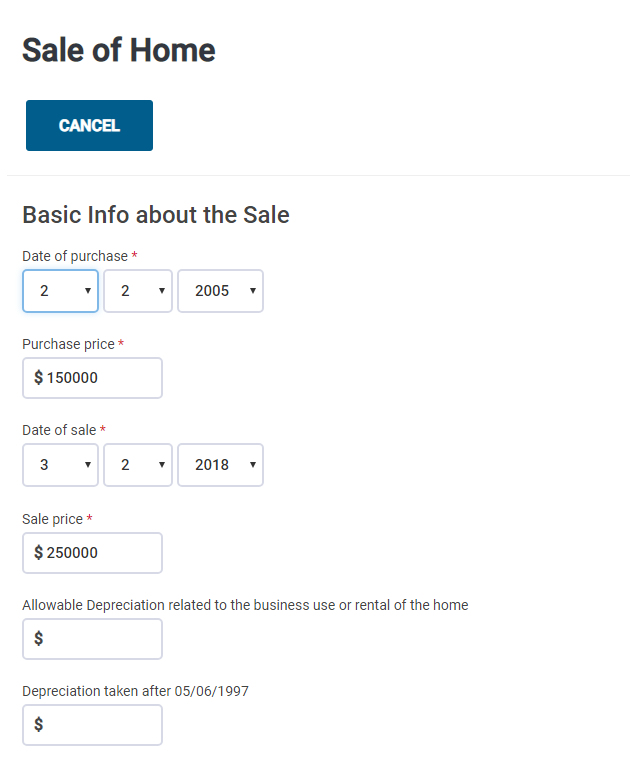
  1. Enter the date the home was purchased and the initial purchase price
  2. Enter the date the home was sold and the selling price
  3. Input any depreciation allowed
  4. Enter the number of days in the last 5 years that the the property was the taxpayer's (and the spouse's if applicable) main home
  5. Enter the number of days in the last 5 years that the taxpayer (and the spouse's if applicable) owned the property
     
  1. Adjustments - Enter any selling expenses incurred that were directly associated with the sale of the home. Selling expenses include real estate commissions, advertising costs, legal fees and any other costs or fees paid in order to sell the home.
  2. General Adjustments - Enter any amounts that increase or decrease the basis of the home. Include settlement fees and closing costs, the cost of additions and improvements and any other increase/decrease to the basis of the home.

NOTE: This is a guide on entering a Sale of Home into the Web1040 Pro program.  This is not intended as tax advice.

Additional Information:

Publication 523 - Selling Your Home

Form 8949 Instructions

Schedule D Instructions